Friday, September 26, 2008

CabWizFixer: Support for files with the same name on Smart Device CAB installers

There is a know bug in cabwiz.exe when your deployment needs several files with the same name in separate folders. This is a typical scenario when you have multiple resource files (i.e. using localization) in a Smart Device Cab Project, but it can also be present when you try to face an app in a generic approach depending on the folders/files structure or just even as a bad coincidence in your app file names. In all cases the cab installer will mess up your deploy copying the same file in all your folders for each group of namesakes.

Let's see an example:

Update: The originally posted 7Wonders sample application has been removed due to copyright issues after asking them about the usage of their material. I replaced that sample with this one:

The Small Catalog Mobile app

This is quite a basic sample, but useful enough, of a good generic approach for a problem. The Problem: We need to implement a Pocket PC app to show a small and simple catalog of a few products. Just a way to show a set of pictures and a quick description of each product. The app should be very simple, and we don't need even to have a database. So, we can just rely on the file directory structure where each subfolder in our app folder will be a new product. The folder name is the product name, and it includes two files named description.txt and picture.jpg for the product description and image correspondingly.

Actually, this approach also makes things easier during the development process. We can build the directory structure in our project as we want it once it's deployed on the device in a sort of WYSIWYG design experience.
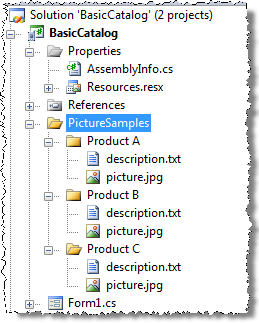
 image

You can download the sample solution source code from the following link:

The solution includes two projects: BasicCatalog project itself, and a setup project. If you try to debug or run the solution from VS, it will be deployed and run as expected. But if you try to install the cab generated thru the setup project, the app will show always the same description and picture for all the products. The reason of this behavior is the cabwiz bug described at the beginning of this post. The same picture.jpg and description.txt files have been installed in all the product folders.

CabWizFixer

Here's when CabWizFixer can help us. This is a small tool we made internally based on part of the source code from the Clarius Orientation Aware Control which includes a built-in workaround for the cabwiz issue, a strong requirement for OAC applications as well as it relies on and extends the standard localization infrastructure provided by .NET Compact Framework.

With CabWizFixer, the Basic Catalog installer will work as expected. After install the tool, you just need to rebuild the installer and the new generated cab will install all the right files on the right location.

CabWizFixer is a experimental tool and it's provided "as is" with no warranties whatsoever. If you want to try it, here is the command-line installer:

For uninstall it just launch from a command-line console:

CabWizFixerInstaller.exe /uninstall


I hope this tool makes your life a little bit easier :)

Take care!

Monday, September 1, 2008

Orientation Aware Control 2008 Released!

Just last weekend we shipped Orientation Aware Control 2008, the latest stable version of the popular control for .Net Compact Framework from Clarius, formerly part of the Microsoft Patterns & Practices Mobile Client Software Factory.

You can find it in three different flavors:

  • OAC 2008 Community Edition: A free version targeting small application development, supporting different horizontal and vertical layouts for the default form factor.
  • OAC 2008 Professional Edition: Commercial version of the product. Take a look at the features comparison chart.
  • OAC 2008 Trial Edition: Fully functional Professional Edition that randomly shows a trial message.

Why should I use OAC 2008 over the p&p OAC?

OAC 2008 is an evolution of the original p&p OAC. Beyond some bug fixes and VB.Net and Smartphone support, you can keep in mind:

  • Visual Studio 2008 designer integration. As far as it targets VS 2005, p&p OAC doesn't support VS 2005.
  • .Net CF 3.5 support
  • It still being compatible with VS 2005.
  • Includes SipAwareContainer, a pretty cool panel control which detects the software input panel (SIP) status and resizes itself accordingly.
  • You can store layouts on satellite assemblies for reduced download time and use a tool for create separate .cab installers for each resolution/culture.

Wanna try it? You can go to the downloads page and take a look at it.

If you have previously installed Orientation Aware Control June 2008 RC Trial Edition over both VS2008 and VS2005 on the same machine, you should verify after uninstalling it and before installing OAC 2008 that the following files have been removed from your system:

Program Files\Microsoft Visual Studio 8\Common7\IDE\PrivateAssemblies\Clarius.UI.OrientationAware.Designer.2.0.dll (v.2.0.2.0)
Program Files\Microsoft.NET\SDK\CompactFramework\v2.0\WindowsCE\DesignerMetadata\Clarius.UI.OrientationAware.*.asmmeta.dll

If any of these files remain on your system, please close Visual Studio and delete all of them before installing Orientation Aware Control 2008.

Hope you like the product. Remember to give us your feedback on the OAC Forum.

I'll continue posting about some of the features and usages of the OAC, so stay tuned!

Tuesday, May 6, 2008

Orientation Aware Control June 2008 RC Trial Edition available for download!

Some time ago the best way to deal with screen rotation in your mobile application was to detect it programmatically and re-layout the screen at runtime, moving and resizing the controls and even changing their content manually, or directly showing a different view with a completely different layout according to the new orientation. An easier option was to use anchoring and docking, which could be good enough in a few cases, but not in most of them. This challenge was not easy at all, and that was the reason because many developers decided to directly forget screen rotation and delivery applications that are almost unusable when the screen is rotated.

What about applications which should run on devices with different form factors? Once again, anchoring and docking are not enough. Remember that in a mobile application you should design your UI thinking from the scratch in order to take full advantage of the screen and maximize the user experience.

One of the main advantages of using Visual Studio 2005/2008 and the .Net Compact Framework is the design-time experience which is great for a single form-factor / orientation, but it's almost useless when you need to design a solution thinking on a really outstanding mobile user experience.

When we worked on the Microsoft Patterns & Practices Mobile Client Software Factory, this challenge was part of our focus, and the need for a design-time experience in order to support rotation and multiple form factors was the goal. The former Orientation Aware Control was the first approach towards this goal. It's indeed part of the Mobile Client Software Factory, and by extending the Localization feature of the Visual Studio designer it provides a design-time approach for supporting screen rotation and multiple form-factors for Windows Mobile 5.0 Pocket PC and Visual Studio 2005. It is, in fact, one of the most popular application blocks of the MCSF, and it has changed the way in what .Net Compact Framework developers should deal with screen rotation and multiple form factors support.

Last year, Clarius Consulting released a new and improved Orientation Aware Control including support for Pocket PC 2003 and Windows CE 5.0. It was developed by the same people who worked on the MCSF Orientation Aware Control lead by Daniel Cazzulino. Unfortunately, this version was released before Orcas, and it didn't include any support for Visual Studio 2008, which was one of the most required features for the next version.

I'm glad to announce that we've just published the Orientation Aware Control June 2008 RC Trial Edition!! This is a new preview of the June Release Candidate, fully functional with a trial message at runtime. This version does include Visual Studio 2008 design-time support! and several bug fixes and improvements. It's good to know that this version works with both VS2005 and VS2008, and it includes support for .Net Compact Framework 2.0 and 3.5!

What are you waiting for? Go ahead and download it! Your feedback will be very appreciated!

Tuesday, March 18, 2008

How to allow minimize being in a modal dialog on Pocket PC using the .Net CF

An interesting question came up today at the Mobility Metro train the trainers workshop in London: How can we allow the Pocket PC user to minimize the application even when he is in a modal dialog?

This is a particular requirement received by an attendee, and it was a little bit challenging problem. I did a small spike on this, and this is my suggested approach.

First of all, we cannot use Form.ShowDialog(), because it shows the 'OK' button at the top right corner, and ideally we should keep the standard 'X' smart minimize button there.

The solution is to use Form.Show() and handle the Form.Closed event of the dialog. We also should take care of the dialog Owner property in order to show only one entry on the Running Programs List.

private void menuItem1_Click(object sender, EventArgs e)
{
Dialog dialog = new Dialog();

//Prepare the app to be 'Running Programs Aware'
this.Text = dialog.Text;
dialog.Owner = this;

//Subscribe to the dialog closed event
dialog.Closed += delegate(object s2, EventArgs e2)
{
//Do something when the dialog is closed
label1.Text = string.Format("DialogResult = {0}", dialog.DialogResult.ToString());
//Update the form text back
this.Text = "MainForm";
};
dialog.Show();
}

Here you can find the spike sourcecode:


Sunday, March 9, 2008

Going back to London for Microsoft Mobility Metro 2008 Train The Trainers (TTT)

Well, I'm glad to say that I've been invited to be instructor in the Microsoft Mobility Metro "Train the Trainers" in UK. It will be my second time in London and I'm sure it'll be as great as the previous one was.

This will be a three days mobility training targeting european instructors audience, that will start on March 18th. The agenda includes several topics, starting with Windows Mobile platform concepts, moving thru the tools, managed code for devices, SQL Compact Edition, Optimization and guidance, and an interesting review of what's coming on in mobile development. Hope to see some of you there.

These days are very busy for me, but I'll try to keep blogging. Stay tuned!

Saturday, March 1, 2008

Looking for an OpenFileDialog for Smartphone? Porting the MobilePractices.OpenFileDialogEx from PocketPC to Smartphone

This morning I've ported the MobilePractices.OpenFileDialogEx custom implementation of the OpenFileDialog to smartphone. Strictly, I've ported it to Windows Mobile 6 Standard Edition. And I want to remark that Smartphone doesn't even support the standard OpenFileDialog. If you try to use the standard version a NotSupportedException is raised. So I thought this port should be extremely useful, and it's additionally fully implemented using the .Net Compact Framework (.Net CF).

The port was pretty much straightforward, besides the expected design constrains. It took me exactly 75 minutes. What were the main issues I have during the process? First of all, the need to make it usable in the smartphone platform. It doesn't make sense to have the same structure with one combo box, the list, and the textbox at the bottom. So, my design decision was to leave the list. I know you may have a new smartphone device which has a qwerty keyboard, but I think it still being the simplest option just to browse the file system. Actually I used to do that even in my laptop. And if I keep the textbox, it'll leave less space for the list, and I think that's critical here. Anyway, if you prefer you can bring the textbox back from the pocket pc version.

The second main issue was how to provide the quick go back to any directory on the current path without the combo box. I've decided to implement this using the right menu, the same way File Explorer does.

It looks this way in the Windows Mobile 6 Standard Edition emulator:

image image

Not bad! But it still being just a starting point. There are many features missing which you probably will find critical in your app. As you can probably noticed, the file list is not sorted, there are no InitialDirectory property, and it doesn't cached any directory info to improve the performance during the browsing. Feel free to add any feature you want. The source code is here:

Monday, February 25, 2008

A custom OpenFileDialog implementation that browses the full file system: MobilePractices.OpenFileDialogEx

Doing a spike yesterday I had the need to use OpenFileDialog to browse and select an existing file. The problem was that I placed the files on the device root. And oops! the Windows Mobile implementation of the OpenFileDialog, this is not a .Net Compact Framework limitation, doesn't allow the user to browse the root. Actually, it doesn't allow the user to browse the whole file system, it just let you browse My Documents subfolders and Storage cards. Very bothering in some cases.

Indeed, this is not the first time I have to deal with it. An I thought I should be just one of many developers with the same problem. So I decided to implement a custom OpenFileDialog in c# targeting PocketPC, but easily portable to Smartphone, and customizable and extensible as well. Wow! I think I should have said that first of all, it's a very simple piece of code. And that's its best feature. You can use it as a starting point.

I've not implemented the full Filter feature of the original OpenFileDialog because I think it's not a common scenario on mobile development and it make the UI overcrowded. Instead, the Filter property of my MobilePractices.OpenFileDialogEx implementation, is just a search pattern.

The MobilePractices.OpenFileDialogEx looks this way:

image

The dialog title can be changed as you wish thru the Text property. At the top of the screen, you can see a ComboBox which can be used to quickly go back to an specific folder.

image

Taking a look at the first snapshot you can notice that I'm identifying storage cards with a different icon. To identify a storage card you can check if the FileInfo.Attributes for it are Directory and Temporary.

if ((info.Attributes & (FileAttributes.Directory | FileAttributes.Temporary))
== (FileAttributes.Directory | FileAttributes.Temporary))
return FileSystemKind.StorageCard;

How to continue with this is up to you. You can add an InitialDirectory property, or some way to keep the current path along the application run, or a modified version which allows you to select a directory instead of a file. Or you can take the code and port it to smartphone. Probably I'll do that soon in a new post. Once more, this is just a starting point!


Here you have the source code including a sample application:


Enjoy!